Quartering Tool
The fastest, most forgiving way to turn aliquot legal descriptions into precise polygons in ArcGIS Pro — built for surveyors, title pros, and landmen who have seen every edge case the PLSS can throw at them.
- Compound and less descriptions, distance & acreage calls
- NEW: online sections database — no section layer required
- NEW: close-to-Explore with full state restore
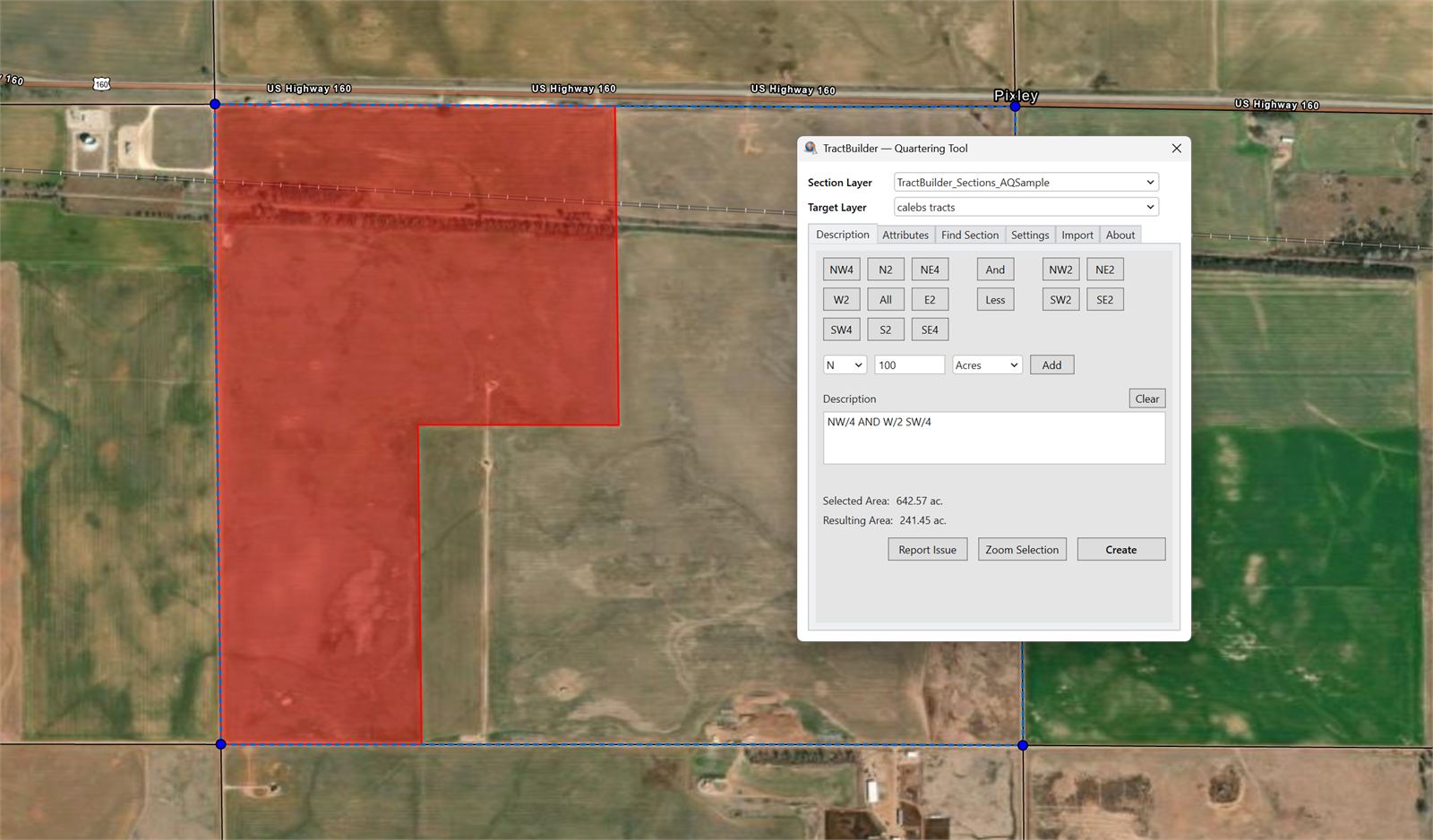
Stop fighting your aliquots.
The Quartering Tool parses the legal descriptions you already read every day — NE¼ NW¼ less the north 10 acres — and lays it down on the map as a clean, consistent polygon. Compound descriptions, less calls, acreage calls, distance calls: all supported out of the box.
When the description is straightforward, a single keystroke is enough. When it isn't, every rule you need is one click away in Settings. The tool stays out of your way until you need it, then does exactly what a surveyor would expect.
What It Does
Every feature below is available on day one. The ones marked NEW shipped in the 2026 release.
Aliquot Entry, Familiar and Forgiving
Type the description the way your source document wrote it — abbreviations, fractions, compound calls, whatever. The parser handles the ambiguity and shows you the polygon before you commit. Get it right the first time.
Online Sections Database NEW
No section layer in your map? The Find Section tab pulls PLSS sections directly from our hosted database. Search by state, county, and meridian; the sections you need appear as a working layer on demand. Zero setup, zero shapefile hunting.
Close & Resume, No Lost Work NEW
Close the tool and ArcGIS Pro instantly drops you into the Explore tool so you can pan, pick, and review. Reopen the Quartering Tool and your last state — inputs, section selection, target layer — is restored exactly where you left it.
In-Tool Layer Binding NEW
Set your section layer and target layer directly in the dockpane — no juggling the ArcGIS editor framework, no accidental edits to the wrong feature class. What you pick in the tool is what the tool writes to, full stop.
Settings for Every Surveying Convention
Rule 2640 variants. Equal cutting mode. Your county doesn't follow the textbook? Pick the convention that matches your records and the tool applies it to every quarter call consistently.
Edit Attributes Without Leaving the Tool
Fill in the feature's attributes as you build the geometry. No round-trip through the ArcGIS editor — the parcel that lands on the map is complete the moment it appears.
Who Uses the Quartering Tool
For Surveyors
Retrace legal descriptions against a PLSS grid, apply your local surveying convention, and write back to your working layer in a single pass. Closure tolerances and aliquot rules respect your county's established practice.
For Title Companies
Plot the legal description from a deed or commitment in seconds. Attribute the polygon with your file reference as you build it. Export to PDF for the working file without ever leaving ArcGIS Pro.
For Landmen
Build lease, tract, or unit boundaries from paper descriptions. Stack tools, settings, and your section layer in one dockpane — then close to Explore when you need the map back.
Ready to see it in action?
Start a free trial and put the Quartering Tool against your real legals today.
Start Free Trial Contact SalesFrequently Asked Questions
What versions of ArcGIS Pro are supported?
The Quartering Tool supports ArcGIS Pro 3.4 and later. We follow Esri's support window so you always have a current build.
Do I need a section layer in my map?
No. The online sections database lets you search our hosted PLSS sections and drop them into your map on demand. If you already have a section layer, the tool will happily use that instead.
Can I control how aliquots are cut?
Yes. Settings include Rule 2640 variants, Equal cutting mode, and other surveying conventions. Pick the one your county uses and the tool applies it to every quarter call.
Is this the same subscription as TractBuilder Pro?
Yes. A TractBuilder Pro subscription includes the Quartering Tool and the Metes & Bounds Tool. AutoQuartering and Online Mapping ship with separate subscriptions because of the volume and infrastructure they require.