TractBuilder Online Mapping
Map a legal description in your browser. No ArcGIS Pro license. No desktop install. Built for title companies, real estate teams, and anyone who occasionally needs to turn a paper description into a boundary — at a price that makes it easy to say yes.
- Quartering and metes-and-bounds modes, both included
- Saved projects, legal history, PDF export
- Works on any modern browser — any device
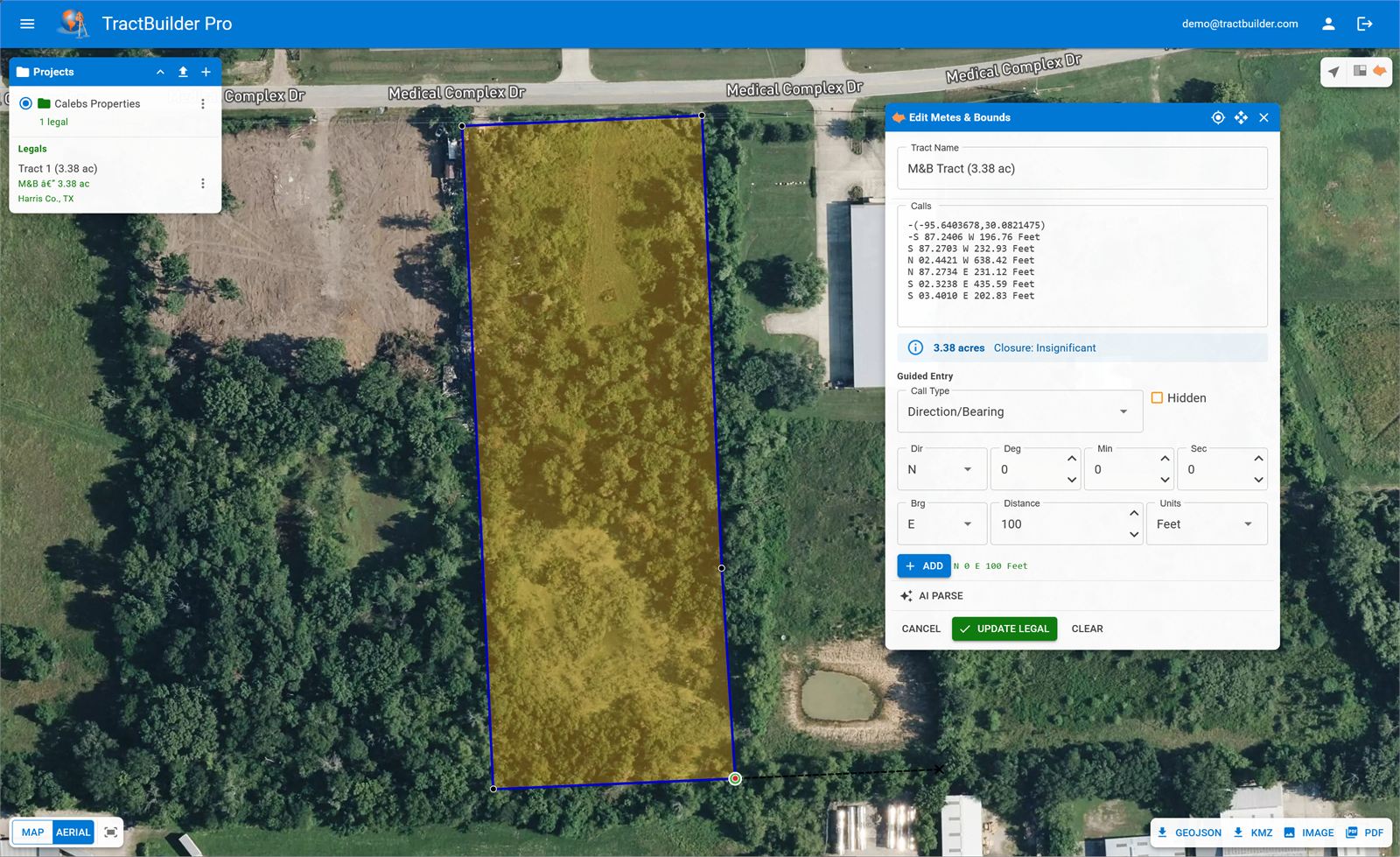
The mapping tool for people who don't do mapping all day.
You're not a GIS analyst and you shouldn't have to become one to plot a legal description. Online Mapping takes the same geometry engine that powers our desktop tools and puts it behind a simple web UI: paste a description, pick your mode, see the polygon. Save the project, export a PDF, move on.
Occasional use shouldn't cost enterprise money. Online Mapping is priced to fit a title office or a real estate firm that needs this three times a week, not three hundred.
What It Does
Both Description Styles, One Tool
Quartering mode for aliquot descriptions. Metes & Bounds mode for bearings and distances. Toggle between them as the document demands — your project stores both.
Projects, History, PDF Export
Organize descriptions into projects. Revisit any legal you've mapped. Export a PDF of the map and the description for your working file. No file system, no versions-of-versions.
Any Device. Any Browser.
A laptop in the field, a tablet in a closing, a phone at your desk — Online Mapping works on any modern browser. Nothing to install, nothing to license per machine.
Which TractBuilder Product Is Right for You?
Online Mapping is the right fit for occasional, browser-based mapping. If you're already in ArcGIS Pro every day, the desktop tools are more powerful — and included in TractBuilder Pro.
| Capability | Online Mapping | Desktop Tools (Pro) | REST API |
|---|---|---|---|
| Runs in a browser | ✓ | — | — |
| ArcGIS Pro 3.4+ add-in | — | ✓ | — |
| Aliquot (quartering) descriptions | ✓ | ✓ | ✓ |
| Metes & bounds descriptions | ✓ | ✓ | ✓ |
| Batch spreadsheet processing | — | AutoQuartering | ✓ |
| AI parsing for prose legals | ✓ | ✓ | ✓ |
| Saved projects & PDF export | ✓ | ✓ | bring your own |
| Price | Low-cost subscription | TractBuilder Pro | Scoped API keys |
Who Uses Online Mapping
Title Companies
Plot the legal from a commitment or a deed without asking the GIS team. Save it to the project, PDF it into the file. Done.
Real Estate Teams
Check a boundary before closing, verify a listing description against the plat, show a client where the property actually sits — all from a browser.
Occasional Mappers
If ArcGIS Pro is overkill for your needs, Online Mapping gives you the same geometry without the license, the install, or the learning curve.
Map your first description in minutes.
No install. No seat license. No GIS team required.
Try Online Mapping Talk to Sales