Metes & Bounds Tool
Type a description in shorthand, or walk through every call in Guided Entry. Closure error and area update live. Curves with tangents, commencing lines, the works. Then history and AI parsing handle the descriptions that used to take a phone call to resolve.
- Every call type — bearings, distances, curves with tangents, chord, delta
- NEW: legal description history you can revisit, edit, and share
- NEW: AI parsing for the toughest paragraph-form descriptions
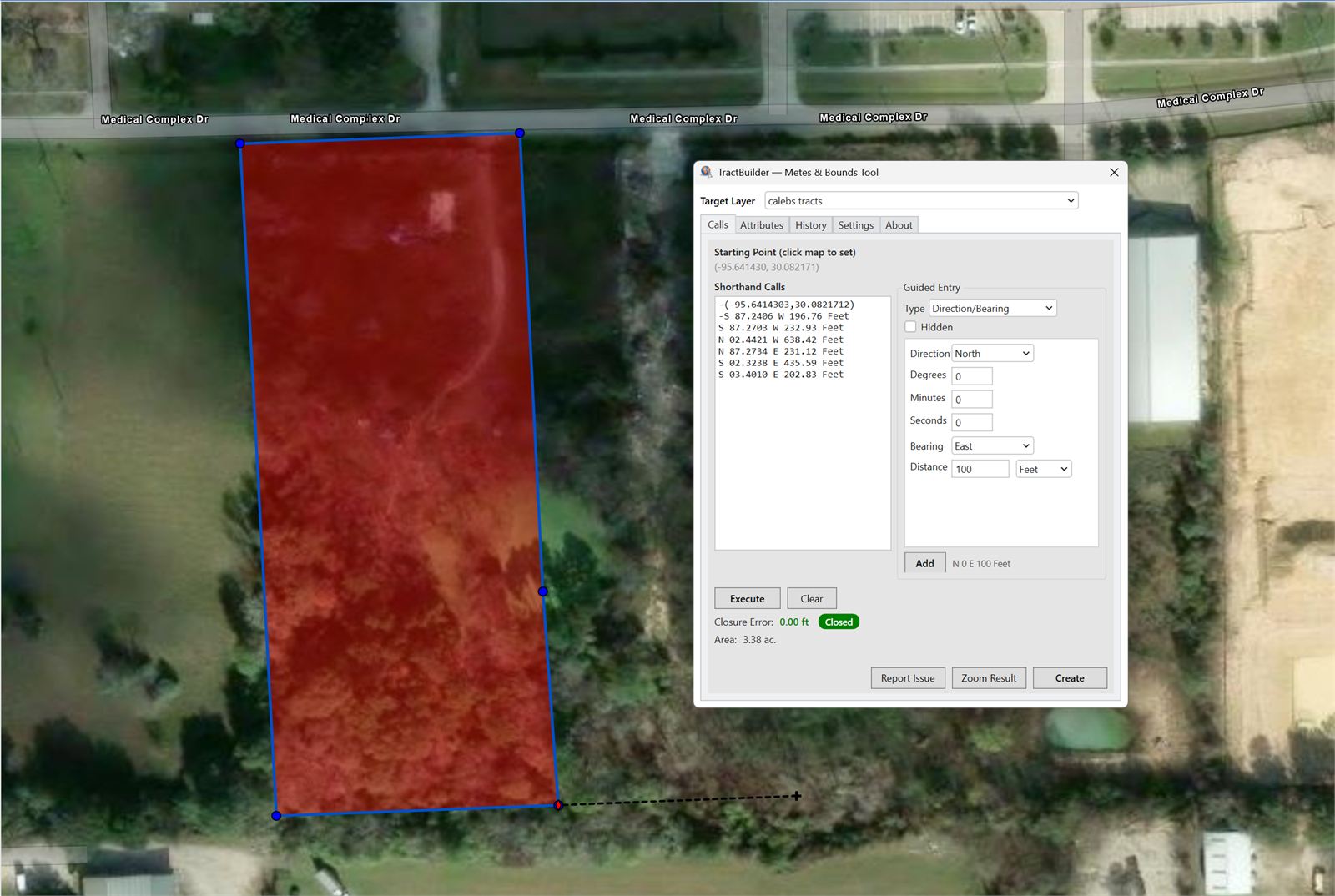
The fastest path from a written description to a closed polygon.
Type calls the way a surveyor would say them — N 45 E 100 Feet — and the tool renders the line. Add a curve with a tangent check, a commencing line, or a delta call and the polygon updates as you type. Closure error and enclosed acreage show in real time, color-coded so you know when the description is clean.
What It Does
Every feature below is available on day one. The ones marked NEW shipped in the 2026 release.
Shorthand and Guided Entry
Veterans type calls in shorthand and watch the preview appear. New users use Guided Entry — pick the call type, fill the fields, learn the shorthand as you go. Both drop into the same tool, the same polygon, the same history.
Every Call Type, Curves Included
Bearings, distances, commencing lines, delta, chord, arc, XY — and curves with tangent checks so you catch the missing piece before the polygon misbehaves. Closure error and area update with every keystroke.
Legal Description History NEW
Every description you build is retained, organized, and searchable. Reopen one and it reloads into the tool for edits. Export the history to JSON and share it with a team member. Something shapefiles and geodatabases never let you do — now built in.
AI Parsing for the Hard Ones NEW
Paste a paragraph-form description — the kind with "thence" and "more or less" and a century of prose — and our AI extracts the calls in structured form, ready to run through the tool. This is the most advanced legal description extractor we ship, and it keeps learning.
Live Closure & Area
Closure error and enclosed acreage recompute as you type. Green means you closed inside your target tolerance. Red or orange tells you a call is off — often which call, often by how much — before you commit the polygon.
Edit Attributes Without Leaving the Tool
Fill in the feature's attributes as you build the geometry. No round-trip through the ArcGIS editor — the parcel that lands on the map is complete the moment it appears.
Who Uses the Metes & Bounds Tool
For Surveyors
Retrace historic descriptions and catch closure errors before they become survey errors. Curves with tangents are first-class citizens, not an afterthought.
For Title Companies
Plot the exception, the tract, or the reservation directly from the deed text. AI parsing handles the prose so you can focus on the polygon.
For Landmen & Abstractors
Build unit boundaries from complex multi-call descriptions. History lets you revisit a tract months later without rebuilding from scratch.
Put it against a real description.
Start a free trial and run the Metes & Bounds Tool against the toughest legal in your working file.
Start Free Trial Contact SalesFrequently Asked Questions
Does AI Parsing send my description to a third party?
No. Only the TractBuilder API and our AI infrastructure see your description — it is not forwarded to any third party, and it is not used to train public models. The description is processed and returned as structured calls, and that's where it stops.
Which call types are supported?
Bearings and distances, commencing lines, curves (arc, delta, chord) with tangent checks, and XY coordinates. Closure error and area recompute on every change.
Is this the same subscription as TractBuilder Pro?
Yes. A TractBuilder Pro subscription includes the Metes & Bounds Tool and the Quartering Tool. AutoQuartering and Online Mapping ship with separate subscriptions because of the volume and infrastructure they require.